'/%3e%3cdefs%3e%3cpattern%20id='pattern0_2104_4598'%20patternContentUnits='objectBoundingBox'%20width='1'%20height='1'%3e%3cuse%20xlink:href='%23image0_2104_4598'%20transform='matrix(0.00376176%200%200%200.0172414%20-0.00219436%200)'/%3e%3c/pattern%3e%3cimage%20id='image0_2104_4598'%20width='267'%20height='58'%20preserveAspectRatio='none'%20xlink:href='data:image/png;base64,iVBORw0KGgoAAAANSUhEUgAAAQsAAAA6CAMAAACQ2ozcAAAAM1BMVEVMaXH////////////////////////////////////////////////////////////////x7/yuAAAAEHRSTlMAoDDgEPBgwIBAINCwkHBQDIOTDwAAAAlwSFlzAAFxGAABcRgB7MGwCAAABm1JREFUaIHlW+uWsyoMLSIIeH3/pz0CKrmgQuusdn0nf2YaMW42kISgr1cQK+SySj+61/9cmm45RLTfRvNV0WoBIptv4/mi6AWLuiVDd0lKmLPGGPsA0nelGG8TZoXU69poTPi/v1smBjB338dZxvk218B/VIrxBl8hth9t73+Zp2x7SdNuLMX+tJTitZCKjQx1MzFquLBVc+hvpBSv8NMX/Hb+Bv2MbS8DaNsVYn9aSvFK2nWB5slHtr0sUL4Ur0vx+usowdL3A1jBhUVcfGmR1HCBFPbvuWhskvuefC4/wkWbWyMgzV2ub39GarhA+cf0KBevHrTdffSvcuGxonzCA73JBGq4gFnt7qN/lYtxwflEWOA3KWJVriWOpkd0+lUuQj6Rsu6QkcuL9jW2o4xbyzTZfpWLOG79FlatgnP5Y9tRnFn3RAYE7p/loo1bJ6GtnSLIYbuwRrz8rq6SCyY/y8W2UU0SFkw7xQCghszN/y4Xr0ZCKjpPxQz46Vjdj9pupiHUBsxclmRXcOG0CKZHfVV9dHqM1QmRrZNU4IVN15kwQ98fNHSlYNsaUsmmEUw899gNuQCck2ur17KwZXcypM6gsVSCtSN4YcozzLmWqtvbNCPRUDKgbU07RiC/z8XgmOnMtHNiYUJZu8Tbg8YW3B6HOK6PwRPQRo1sT21nBGVq73OxKNaElx8n3iiAR4CL8YbOHlH0YHnXtAL2osg2Gr8PuMgIIaPNTIooqIJdijfkyFO6b6u9gBTDo1M1PKOK6bNcYCBtf9Gwqcc7LHgr1qqFaHil69Y2KAY9zMWe/Ny3BWSU4vVdZ3UtvCHxGuQD7m2nmfY0FyBBGK8bJidXitf/gxbA7DVQwStdBbbVng48zsUxMexdy7EWr/8H9dw/QjJNLRfHKnmci2Pk5G1LW4nX/2U9x5p5eYOLvYj6PBfb+qXHfacWy/H6P6yuhavBfl1Cl0VtK7MaaGcS30wZF6ny2WS4kD71ttjyZgXHEDk5j4Ew2dTh9SbREYCEqA/NBBXY9pHX4E2eLOPiRQT1RsDAv0sc7QZhOHowIwxjHd4wDcDEmCJ1jmjQREG2werBxt3HXKRIwE+cEAYwmMijygze/hxvrq6FNJp0mNp2Zxf0x1ykWD8zLmA7lIChqe+u8U4Eb2goLbjYSaCJdnDqC20jR4JOAMzHXADYjAs4pCj5QYvH3uCFVjy66IR6Y8zoSfDlPr1rhEKdyHCB64GwJ8PHXAA144L3eBcYaw3DixwfW3skqw+GcUpHj1fP60TwSveXXKDRP7fAubjBi2bKwnrAT5p/gAsEEFuA41jNBQ60YZEip8Lq4r/NBexOLRfbvX0XfGZY5i5uVjcNOzs6tz0S23/GhYNctKcWKrmI4Sq+2BlebpRm9FSY8IRYcVTndS3si6DrEX/JBfKdeKjgitcMLw4DxNf7oVcHW/viSLt/kfqV46KHF9BofR5Tr7iA0QKhg6lIJqZe4Q3hExAroJEgIe6c17XgpEOeZy7ighatS7mA0RDlTyiJr8Obr2sJqjmva4H1g7eObREXNEiVcoGeBWqKuXy7FG9kBEhwfyjPZG9wkQOVfJlgS/Bu9+wbyy5z7YoLNL2XfgNMisFTBd6+qH5xW9fqjbV6JLUVfc4FzuS6yVoz3Lyzw7jAi2SlfrWiBTkhaOvwZrnomaa6lrNPxRwX2ft1JRe3Jb40mUvxkmc+Vtcy0NyFjgIv5oJOjEz39nVXitf/Rb6c+4txufQXWTkqpjkuXrnDLlnLhcsfmSU5Up9SvP7ZvK7F4shFXSsrB5lZLrLHXbzGd80FziS4pN15Kd6QXIGJYUhftolyXtfKSgrBWS5c7p6plguyayJyFmcv8IZRT1nmHnKJ5jzvzAoormS5yFoYqrm4AgI//LjFu3cvkKvioLQp2qlIlQseSuEXQYDt7JqFiVmei+wqqeeCfBIFewcT5XK80R+rwZgNx/F60qEhm3Zgu+HHuxK54hMucmTYei5e7B2NCD37hknAy9tDvPS0WjDNef1iTUQMploZvKc942L/3Aj0sXmDi9UOGw0KoQovzAPD2miRhr35mr7fCo3BO0K9pq/ONOBbL03NpIfIcXNQI2gP2gIteym5gSmkGvgbmRd4J/aqj93zFiUc1VCSc+K0WWWytd+HtHZ678YTQ2Yu+4jSzVePbcNVe6n51+U/wZKesx3N5aEAAAAASUVORK5CYII='/%3e%3c/defs%3e%3c/svg%3e)

Core Concepts
The building blocks behind Bitnob Enterprise wallet infrastructure.
Understanding these concepts will help you model your integration correctly and configure policies that reflect your actual security requirements.
Custody Model
Bitnob Enterprise is a managed or co-custodial setup. Private keys are generated inside the Bitnob Secure Enclave — a key management system built on AWS Nitro Enclaves — and never leave that hardware boundary.
The platform itself cannot move funds without an authenticated API call that satisfies every configured policy. Every signing event is recorded as an immutable activity entry for compliance and audit.
Keys are generated in hardware isolation. No process outside the enclave ever sees the raw private key material.
Policies run before signing. The enclave only releases a signature when the authenticated request satisfies every rule in every active policy.
Bitnob cannot unilaterally move funds. There is no admin backdoor. Root quorum governance applies even to Bitnob-side operations on your organisation.
Resource Hierarchy
All resources are strictly nested. Understanding this hierarchy is essential for designing your wallet topology.
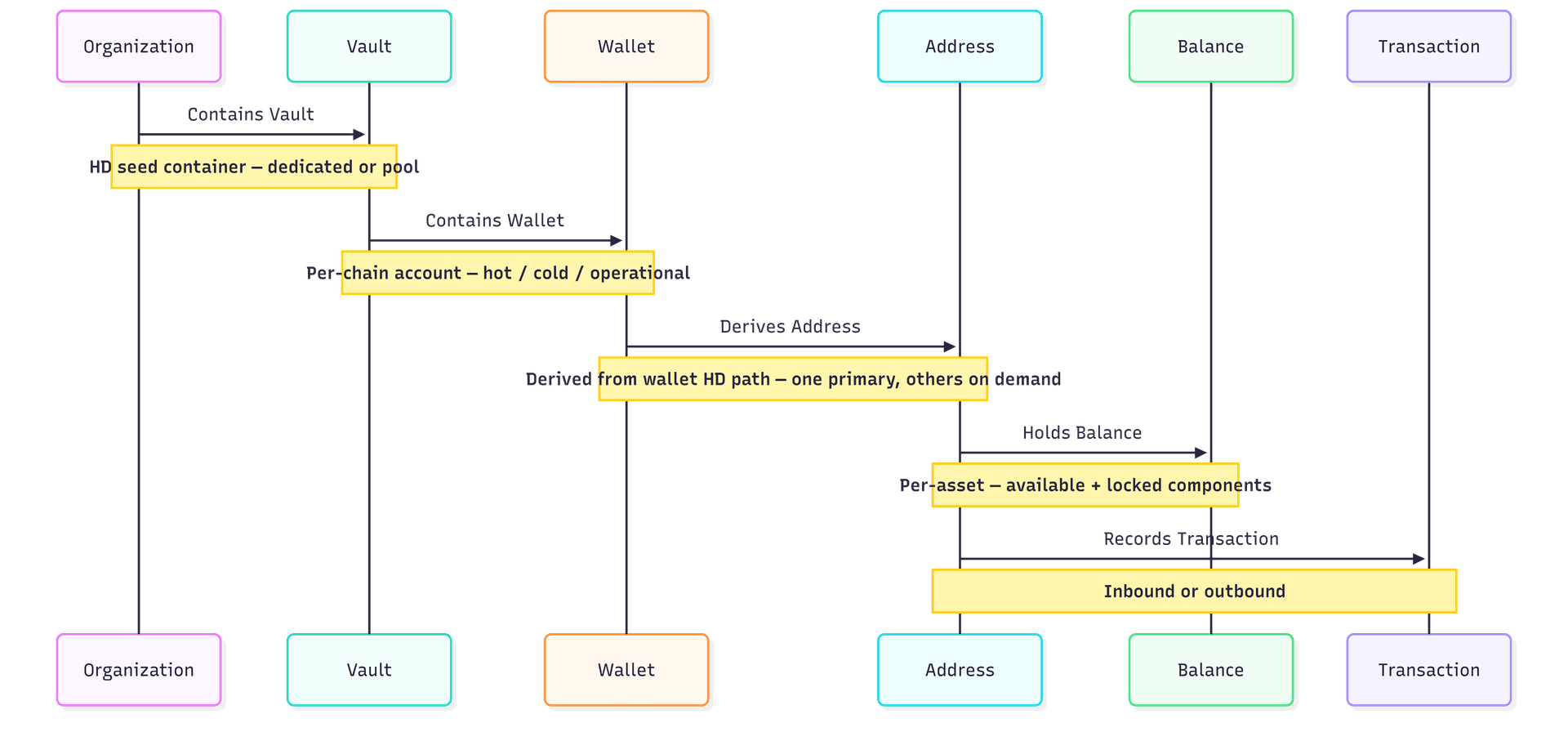
Organisation — The top-level tenant. All resources are scoped to your organisation, derived automatically from your API key. Identified by organization_id (UUID), resolved from the key rather than supplied per request.
Vault — An HD seed container. A dedicated vault maps 1-to-1 with a single wallet per chain. A pool vault holds unlimited wallets, ideal for assigning one per customer. Identified by id (UUID). See Vaults.
Wallet — A logical account derived from a vault's seed, scoped to a specific chain. Holds multiple asset balances and owns all addresses derived from it. Identified by id (UUID), with vault_id (UUID) referencing its parent vault. See Wallets.
Address — A blockchain address derived from the wallet's HD path. Each wallet gets one primary address per chain; additional addresses can be derived on demand and listed. Identified by id (UUID), with wallet_id (UUID) referencing its parent wallet; the on-chain value is the separate address field.
Vault Types
Choose the vault type that matches your use case. The choice is irreversible — upgrading a dedicated vault to a pool vault cannot be undone. Existing vaults can be inspected with List Vaults and Get Vault.
type | wallets per chain | best for |
|---|---|---|
dedicated | 1 | Treasury accounts, operational hot wallets, cold storage |
pool | Unlimited | Exchanges, neobanks, any platform assigning one wallet per customer |
Wallet Types
The type is set on Create Wallet and can be reviewed with List Wallets or changed with Update Wallet.
type | description |
|---|---|
hot | Online, actively signing transactions. Suitable for customer deposit and withdrawal wallets. |
cold | Offline storage. Requires elevated approval thresholds configured in your policies before the enclave will sign. |
operational | System-managed wallets used for gas stations and internal fund sweeps. Not directly customer-facing. |
Policy Engine
A policy is a declarative rule that runs before the Bitnob Secure Enclave signs a transaction. Policies are organisation-scoped and evaluated by category in priority order — the first matching rule wins.
action | effect |
|---|---|
block | Reject the transaction outright. No signing occurs. |
alert | Allow the transaction but notify stakeholders. |
require_approval | Pause the transaction in pending_authorization until enough approvers vote. |
delay | Queue the transaction for deferred execution. |
Policies are evaluated by category:
access — who can access which wallets
whitelist — restrict destinations to known addresses only
limits — per-transaction spending caps
approvals — multi-signature requirements
velocity — daily, weekly, or monthly volume controls
compliance — regulatory controls
quorum — root-level governance for policy changes themselves
Approvals and Root Quorum
When a policy fires require_approval, an approval request is created and the transaction stops at pending_authorization. Approvers then vote:
Once the required number of approvals is reached, the transaction proceeds automatically
If any approver rejects, the transaction terminates as rejected
A root quorum is a special policy of category quorum that protects policy changes themselves. When a root quorum is active, creating, editing, or deleting any policy also requires quorum approval — preventing any single administrator from unilaterally weakening your security controls.
Configure a root quorum before deploying to production. Without one, any API key with admin permission can modify policies unilaterally.
Gas Stations
A gas station is a pre-funded, organisation-owned account whose sole job is to sponsor transaction fees on behalf of customer wallets — see Gas Stations and Sponsor and Broadcast.
Gas stations are scoped per chain and network
When a customer wallet has insufficient native gas, the gas station tops it up automatically before broadcasting
Each gas-sponsored transfer emits a separate gas_sponsorship transaction linked to the original via sponsor_tx_id
On Tron, gas stations support TRX staking and resource delegation — stake once for energy and bandwidth so USDT transfers cost near-zero TRX
Set an auto_refill_enabled threshold and a refill_from_wallet_id so the gas station tops itself up when its balance runs low. Monitor health via GET /gasstations/stats.
Address Book
The address book is an organisation-level allowlist of named, validated recipient addresses. It works alongside whitelist policies to restrict outbound transfers to only known, pre-approved destinations.
Address book entries are immutable — the on-chain address string cannot be edited after creation. To change a destination, delete the entry and re-add it.
Addresses are validated against the specified chain at creation time.
Pair address book entries with a whitelist category policy to block all outbound transfers to non-whitelisted addresses.
Transaction Lifecycle
Every outbound transaction moves through a defined set of statuses. Understanding these helps you design correct notification handlers and UI states. The calls involved are Create Transaction, Get Transaction, and List Transactions.
status | description |
|---|---|
pending_signature | Transaction created. Awaiting Enclave signing. |
pending_authorization | A policy requires multi-party approval. Transaction is paused until approvers vote. |
signed | Signed by the Enclave. Not yet broadcast. |
awaiting_sponsorship | Native gas is being transferred from a gas station before broadcast. |
broadcasting | Submitted to the blockchain network. |
confirming | On-chain and accumulating block confirmations. |
completed | Confirmed with sufficient confirmations. Terminal. |
failed | Errored at any stage. Terminal. |
cancelled | Cancelled by the requester before broadcast. Terminal. |
rejected | An approver denied the approval request. Terminal. |