

Custody model
Bitnob Enterprise is non-custodial. You hold the assets, and Bitnob cannot move them. Private keys are generated inside the Bitnob Secure Enclave, a key management system built on AWS Nitro Enclaves, and never leave that hardware boundary. The platform itself cannot move funds without an authenticated API call that your enforced policy allows. Every signing event is recorded as an immutable activity entry for compliance and audit.- Keys are generated in hardware isolation. No process outside the enclave ever sees the raw private key material.
- Policies run before signing. The enclave only releases a signature when your enforced policy allows the authenticated request.
- Bitnob cannot unilaterally move funds. There is no admin backdoor. Root quorum governance applies even to Bitnob-side operations on your organization.
Resource hierarchy
All resources are strictly nested. Understanding this hierarchy is essential for designing your wallet topology.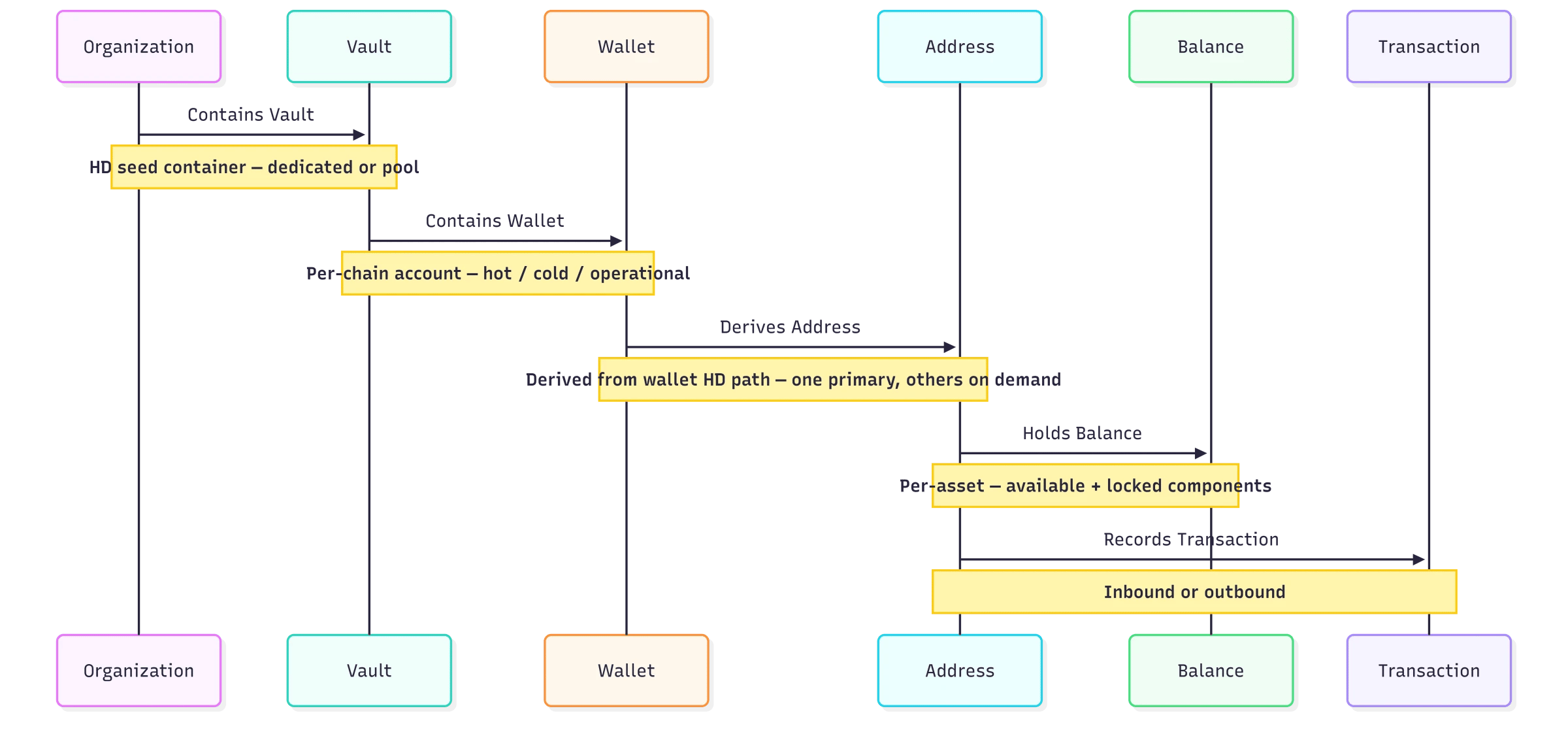
- Organization: the top-level tenant. All resources are scoped to your organization, derived automatically from your API key.
- Vault: an HD seed container. A dedicated vault maps 1-to-1 with a single wallet per chain. A pool vault holds unlimited wallets, ideal for assigning one per customer. See Vaults.
- Wallet: a logical account derived from a vault’s seed, scoped to a specific chain. Holds multiple asset balances and owns all addresses derived from it. See Wallets.
- Address: a blockchain address derived from the wallet’s HD path. Each wallet gets one primary address when it is created. Account-based chains hold exactly one address per wallet. Bitcoin wallets can derive more. List addresses returns them.
Vault types
Choose the vault type that matches your use case. The choice is irreversible, upgrading a dedicated vault to a pool vault cannot be undone. Existing vaults can be inspected with List Vaults and Get Vault.Wallet types
The type is set on Create Wallet and can be reviewed with List Wallets. It can’t be changed later: Update Wallet only changesname and metadata.
Policy engine
A policy is an ordered list of rules that runs before the Bitnob Secure Enclave signs a transaction. Your organization enforces one policy at a time. Rules are evaluated in order, and the first rule whose conditions all match decides the outcome.
Every policy has a category that describes its purpose:
access, whitelist, limits, approvals, velocity, compliance, or quorum. quorum is reserved for the policy that governs administrative changes.
To write, test, and activate a policy, see Policies.
Approvals and root quorum
When a rule firesrequire_approval, the transaction stops at pending_authorization until the rule’s approvers act on it:
- Once the required number of approvals is reached, the transaction proceeds automatically.
- If an approver rejects it, the transaction terminates as
rejected.
quorum that protects administrative operations, including policy activation. Activate policy never applies a policy directly: it opens an approval request for the quorum, and the policy becomes enforced only once enough quorum approvers approve. No single API key or administrator can change what your organization enforces.
See Policy lifecycle and quorum.
Gas stations
A gas station is a pre-funded, organization-owned balance of a chain’s native asset that pays network fees for your wallets: see Gas stations.- A gas station works on one chain. Create one for each chain you send sponsored transactions on.
- Send with
sponsor: trueon Create transaction, and the gas station pays the fee. The transaction passes throughawaiting_sponsorship, and recordssponsoredand thegas_station_idthat paid. - On Tron, a gas station can also fund and broadcast a transaction someone else signed, with Sponsor and broadcast.
threshold, turn on auto_refill_enabled, and set a refill_from_wallet_id, so the gas station tops itself up when its balance runs low. Its health_status is low below the threshold, and the gas_station.low_balance, gas_station.critical_balance, and gas_station.auto_refilled events report on it.
To set one up, and to sponsor transfers from your users’ own addresses, see Gas sponsorship.
Address book
The address book is an organization-level list of named, validated recipient addresses. A consolidation rule can sweep to an address book entry withdestination_address_book_id.
To restrict where a wallet can send, add a policy rule with a to_address not_in condition that blocks any address you haven’t listed. See Rule reference.
Transaction lifecycle
Every outbound transaction moves through a defined set of statuses. Understanding these helps you design correct notification handlers and UI states. The calls involved are Create Transaction, Get Transaction, and List Transactions.
Create transaction returns
201 when the transaction was signed and submitted, and 202 when it is pending_authorization or delayed. In both 202 cases the transaction is persisted and its funds are locked.