'/%3e%3cdefs%3e%3cpattern%20id='pattern0_2104_4598'%20patternContentUnits='objectBoundingBox'%20width='1'%20height='1'%3e%3cuse%20xlink:href='%23image0_2104_4598'%20transform='matrix(0.00376176%200%200%200.0172414%20-0.00219436%200)'/%3e%3c/pattern%3e%3cimage%20id='image0_2104_4598'%20width='267'%20height='58'%20preserveAspectRatio='none'%20xlink:href='data:image/png;base64,iVBORw0KGgoAAAANSUhEUgAAAQsAAAA6CAMAAACQ2ozcAAAAM1BMVEVMaXH////////////////////////////////////////////////////////////////x7/yuAAAAEHRSTlMAoDDgEPBgwIBAINCwkHBQDIOTDwAAAAlwSFlzAAFxGAABcRgB7MGwCAAABm1JREFUaIHlW+uWsyoMLSIIeH3/pz0CKrmgQuusdn0nf2YaMW42kISgr1cQK+SySj+61/9cmm45RLTfRvNV0WoBIptv4/mi6AWLuiVDd0lKmLPGGPsA0nelGG8TZoXU69poTPi/v1smBjB338dZxvk218B/VIrxBl8hth9t73+Zp2x7SdNuLMX+tJTitZCKjQx1MzFquLBVc+hvpBSv8NMX/Hb+Bv2MbS8DaNsVYn9aSvFK2nWB5slHtr0sUL4Ur0vx+usowdL3A1jBhUVcfGmR1HCBFPbvuWhskvuefC4/wkWbWyMgzV2ub39GarhA+cf0KBevHrTdffSvcuGxonzCA73JBGq4gFnt7qN/lYtxwflEWOA3KWJVriWOpkd0+lUuQj6Rsu6QkcuL9jW2o4xbyzTZfpWLOG79FlatgnP5Y9tRnFn3RAYE7p/loo1bJ6GtnSLIYbuwRrz8rq6SCyY/y8W2UU0SFkw7xQCghszN/y4Xr0ZCKjpPxQz46Vjdj9pupiHUBsxclmRXcOG0CKZHfVV9dHqM1QmRrZNU4IVN15kwQ98fNHSlYNsaUsmmEUw899gNuQCck2ur17KwZXcypM6gsVSCtSN4YcozzLmWqtvbNCPRUDKgbU07RiC/z8XgmOnMtHNiYUJZu8Tbg8YW3B6HOK6PwRPQRo1sT21nBGVq73OxKNaElx8n3iiAR4CL8YbOHlH0YHnXtAL2osg2Gr8PuMgIIaPNTIooqIJdijfkyFO6b6u9gBTDo1M1PKOK6bNcYCBtf9Gwqcc7LHgr1qqFaHil69Y2KAY9zMWe/Ny3BWSU4vVdZ3UtvCHxGuQD7m2nmfY0FyBBGK8bJidXitf/gxbA7DVQwStdBbbVng48zsUxMexdy7EWr/8H9dw/QjJNLRfHKnmci2Pk5G1LW4nX/2U9x5p5eYOLvYj6PBfb+qXHfacWy/H6P6yuhavBfl1Cl0VtK7MaaGcS30wZF6ny2WS4kD71ttjyZgXHEDk5j4Ew2dTh9SbREYCEqA/NBBXY9pHX4E2eLOPiRQT1RsDAv0sc7QZhOHowIwxjHd4wDcDEmCJ1jmjQREG2werBxt3HXKRIwE+cEAYwmMijygze/hxvrq6FNJp0mNp2Zxf0x1ykWD8zLmA7lIChqe+u8U4Eb2goLbjYSaCJdnDqC20jR4JOAMzHXADYjAs4pCj5QYvH3uCFVjy66IR6Y8zoSfDlPr1rhEKdyHCB64GwJ8PHXAA144L3eBcYaw3DixwfW3skqw+GcUpHj1fP60TwSveXXKDRP7fAubjBi2bKwnrAT5p/gAsEEFuA41jNBQ60YZEip8Lq4r/NBexOLRfbvX0XfGZY5i5uVjcNOzs6tz0S23/GhYNctKcWKrmI4Sq+2BlebpRm9FSY8IRYcVTndS3si6DrEX/JBfKdeKjgitcMLw4DxNf7oVcHW/viSLt/kfqV46KHF9BofR5Tr7iA0QKhg6lIJqZe4Q3hExAroJEgIe6c17XgpEOeZy7ighatS7mA0RDlTyiJr8Obr2sJqjmva4H1g7eObREXNEiVcoGeBWqKuXy7FG9kBEhwfyjPZG9wkQOVfJlgS/Bu9+wbyy5z7YoLNL2XfgNMisFTBd6+qH5xW9fqjbV6JLUVfc4FzuS6yVoz3Lyzw7jAi2SlfrWiBTkhaOvwZrnomaa6lrNPxRwX2ft1JRe3Jb40mUvxkmc+Vtcy0NyFjgIv5oJOjEz39nVXitf/Rb6c+4txufQXWTkqpjkuXrnDLlnLhcsfmSU5Up9SvP7ZvK7F4shFXSsrB5lZLrLHXbzGd80FziS4pN15Kd6QXIGJYUhftolyXtfKSgrBWS5c7p6plguyayJyFmcv8IZRT1nmHnKJ5jzvzAoormS5yFoYqrm4AgI//LjFu3cvkKvioLQp2qlIlQseSuEXQYDt7JqFiVmei+wqqeeCfBIFewcT5XK80R+rwZgNx/F60qEhm3Zgu+HHuxK54hMucmTYei5e7B2NCD37hknAy9tDvPS0WjDNef1iTUQMploZvKc942L/3Aj0sXmDi9UOGw0KoQovzAPD2miRhr35mr7fCo3BO0K9pq/ONOBbL03NpIfIcXNQI2gP2gIteym5gSmkGvgbmRd4J/aqj93zFiUc1VCSc+K0WWWytd+HtHZ678YTQ2Yu+4jSzVePbcNVe6n51+U/wZKesx3N5aEAAAAASUVORK5CYII='/%3e%3c/defs%3e%3c/svg%3e)

Webhooks & Event Handling
Webhooks power the most important parts of your system: receiving Bitcoin, settling fiat, delivering airtime, or triggering a downstream event. They are the bridge between Bitnob and your app when something changes — and they must be handled with care.
This guide teaches you how to build a robust webhook system: one that can handle retries, duplicate messages, bad payloads, delayed delivery, and even downstream service outages.
How Webhooks Work
A webhook is an HTTP request Bitnob sends to your server when something happens. Instead of you polling an endpoint to see “has this payment arrived?”, Bitnob notifies you the moment it’s confirmed. Per-product event catalogues live in the API reference: deposits and addresses, withdrawals, payouts, and virtual cards.
For example, when a user sends BTC and it clears, Bitnob sends:
This is a push notification for your backend. You must handle it like an incoming transaction.
Webhook Flow Overview
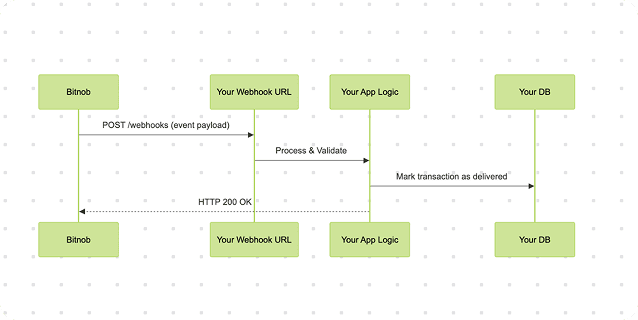
If your app does not return a 200 OK, Bitnob retries the webhook.
What You Get from Bitnob
Bitnob supports:
Secure webhook delivery for all asynchronous flows
A dashboard to inspect webhook logs, payloads, and retry attempts
Webhooks for deposits, withdrawals, payouts, trades, cards, and virtual account funding
This makes debugging significantly easier, especially during integration or failure scenarios.
Writing a Webhook Handler
Use a backend route that accepts POST requests with a JSON payload.
Example in Node.js:
Key things to remember:
Respond with 200 OK quickly to prevent retries.
Do not block this handler with long-running DB calls or downstream logic (consider using a queue).
Log every webhook attempt with timestamp and reference.
Bitnob Webhook Retry Behavior
Delivery and retry behaviour is documented in the webhooks overview. Bitnob retries if:
Your endpoint is offline or times out
Your server returns a 5xx
Your server returns a 4xx other than 400, 404, 410, 422 or 451 (those are final and are not retried)
A failed delivery is retried with increasing delays, up to the retry count set on your webhook (1 to 5 delivery attempts in total), then delivery stops. Any 2xx counts as delivered. The same event can arrive more than once and events can arrive out of order, so you must handle idempotency and must not assume ordering.
Idempotency: Why It Matters
Idempotency means processing a webhook once and only once, no matter how many times it is received.
Without idempotency, you may:
Send multiple offramps for the same crypto payment
Deliver airtime multiple times (especially dangerous if the amount is large)
Trigger double card funding or duplicate messages to a user
Corrupt internal logs by writing duplicate events with different timestamps
Real-World Failure Example
Before processing any event, check if that reference has already been marked as processed in your database.
Bitnob sends transfer.success
Your webhook server receives it but times out before responding
Bitnob retries
Your app processes it again → the same withdrawal is marked paid twice, or a customer is credited twice
How to Fix It
Suggested Schema
Every time you create a quote, store it alongside your transaction or UI session.
id | reference | event | status | received at |
|---|---|---|---|---|
a | 944a4089-6065-49ca-8f43-fb10f15c59e6 | transfer.success | processed | 2025-04-08T14:20 |
This makes auditing, debugging, and duplicate suppression easy.
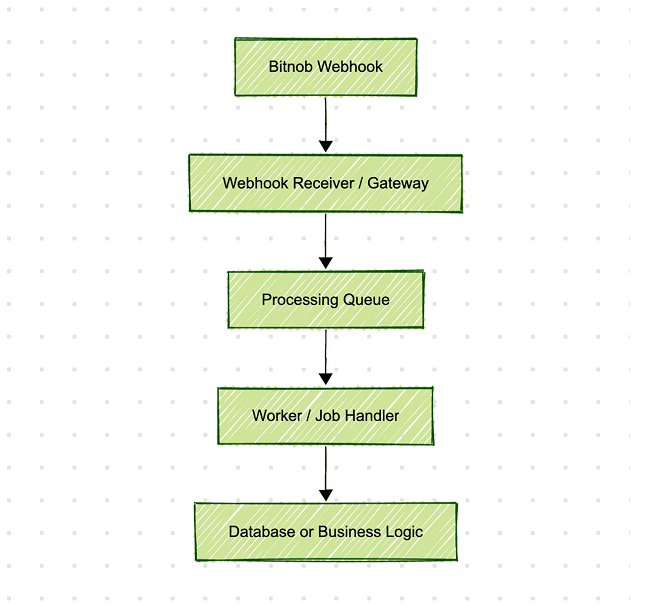
Recommended Webhook Architecture (with Queue)
This decouples fast acknowledgment (step B) from slow logic (step D). Bitnob gets a 200 OK immediately. You process the event asynchronously in the background. Use queues like:
BullMQ or BeeQueue (Node.js)
Sidekiq or Sneakers (Ruby)
Celery (Python)
Redis Streams or Kafka (at scale)
Securing Your Webhooks
Signature Verification
Bitnob signs every webhook with the x-bitnob-signature header — see Verifying Events for the reference implementation, and Source IPs if you also filter inbound traffic by IP. Verify the payload:
If the signature check fails, discard the request.
IP Allowlisting
Bitnob sends webhooks from the following addresses. If your firewall restricts inbound traffic, allow them so events can reach your endpoint:
ip address | use |
|---|---|
18.171.51.218 | Webhook delivery |
13.134.154.133 | Webhook delivery |
These addresses can change, and we announce changes ahead of time. Treat the allowlist as a network convenience, not your security boundary — signature verification is what proves an event came from us.
Any host can send a request from an allowlisted address. Verify the signature on every event, whether or not you filter by IP.
HTTPS Required
Always use https:// URLs for your webhook. Never expose webhooks over HTTP.
Testing and Debugging Webhooks
For local development:
Use ngrok, localtunnel, or cloudflared to expose your local server
Simulate a transaction (e.g., simulate deposit in sandbox) — for cards there is a dedicated Simulate Webhook endpoint
Use webhook inspection tools to replay and analyze events
You can also log webhook attempts using a simple logger:
For production observability, log:
Event type
Reference
Timestamp
Delivery status (received, retried, failed)
What to Always Do
Handle webhooks in a dedicated endpoint
Respond with 200 OK fast
Always make your logic idempotent
Log everything (reference, type, status)
Use a queue if your processing takes time
Verify signatures to secure the source
Use the Bitnob dashboard to inspect payloads and retry if needed
Webhooks are your single source of truth for offchain confirmations. If you treat them like production infrastructure, your product will feel real-time, even though the underlying rails (blockchain, fiat, telcos) are asynchronous and imperfect.