'/%3e%3cdefs%3e%3cpattern%20id='pattern0_2104_4598'%20patternContentUnits='objectBoundingBox'%20width='1'%20height='1'%3e%3cuse%20xlink:href='%23image0_2104_4598'%20transform='matrix(0.00376176%200%200%200.0172414%20-0.00219436%200)'/%3e%3c/pattern%3e%3cimage%20id='image0_2104_4598'%20width='267'%20height='58'%20preserveAspectRatio='none'%20xlink:href='data:image/png;base64,iVBORw0KGgoAAAANSUhEUgAAAQsAAAA6CAMAAACQ2ozcAAAAM1BMVEVMaXH////////////////////////////////////////////////////////////////x7/yuAAAAEHRSTlMAoDDgEPBgwIBAINCwkHBQDIOTDwAAAAlwSFlzAAFxGAABcRgB7MGwCAAABm1JREFUaIHlW+uWsyoMLSIIeH3/pz0CKrmgQuusdn0nf2YaMW42kISgr1cQK+SySj+61/9cmm45RLTfRvNV0WoBIptv4/mi6AWLuiVDd0lKmLPGGPsA0nelGG8TZoXU69poTPi/v1smBjB338dZxvk218B/VIrxBl8hth9t73+Zp2x7SdNuLMX+tJTitZCKjQx1MzFquLBVc+hvpBSv8NMX/Hb+Bv2MbS8DaNsVYn9aSvFK2nWB5slHtr0sUL4Ur0vx+usowdL3A1jBhUVcfGmR1HCBFPbvuWhskvuefC4/wkWbWyMgzV2ub39GarhA+cf0KBevHrTdffSvcuGxonzCA73JBGq4gFnt7qN/lYtxwflEWOA3KWJVriWOpkd0+lUuQj6Rsu6QkcuL9jW2o4xbyzTZfpWLOG79FlatgnP5Y9tRnFn3RAYE7p/loo1bJ6GtnSLIYbuwRrz8rq6SCyY/y8W2UU0SFkw7xQCghszN/y4Xr0ZCKjpPxQz46Vjdj9pupiHUBsxclmRXcOG0CKZHfVV9dHqM1QmRrZNU4IVN15kwQ98fNHSlYNsaUsmmEUw899gNuQCck2ur17KwZXcypM6gsVSCtSN4YcozzLmWqtvbNCPRUDKgbU07RiC/z8XgmOnMtHNiYUJZu8Tbg8YW3B6HOK6PwRPQRo1sT21nBGVq73OxKNaElx8n3iiAR4CL8YbOHlH0YHnXtAL2osg2Gr8PuMgIIaPNTIooqIJdijfkyFO6b6u9gBTDo1M1PKOK6bNcYCBtf9Gwqcc7LHgr1qqFaHil69Y2KAY9zMWe/Ny3BWSU4vVdZ3UtvCHxGuQD7m2nmfY0FyBBGK8bJidXitf/gxbA7DVQwStdBbbVng48zsUxMexdy7EWr/8H9dw/QjJNLRfHKnmci2Pk5G1LW4nX/2U9x5p5eYOLvYj6PBfb+qXHfacWy/H6P6yuhavBfl1Cl0VtK7MaaGcS30wZF6ny2WS4kD71ttjyZgXHEDk5j4Ew2dTh9SbREYCEqA/NBBXY9pHX4E2eLOPiRQT1RsDAv0sc7QZhOHowIwxjHd4wDcDEmCJ1jmjQREG2werBxt3HXKRIwE+cEAYwmMijygze/hxvrq6FNJp0mNp2Zxf0x1ykWD8zLmA7lIChqe+u8U4Eb2goLbjYSaCJdnDqC20jR4JOAMzHXADYjAs4pCj5QYvH3uCFVjy66IR6Y8zoSfDlPr1rhEKdyHCB64GwJ8PHXAA144L3eBcYaw3DixwfW3skqw+GcUpHj1fP60TwSveXXKDRP7fAubjBi2bKwnrAT5p/gAsEEFuA41jNBQ60YZEip8Lq4r/NBexOLRfbvX0XfGZY5i5uVjcNOzs6tz0S23/GhYNctKcWKrmI4Sq+2BlebpRm9FSY8IRYcVTndS3si6DrEX/JBfKdeKjgitcMLw4DxNf7oVcHW/viSLt/kfqV46KHF9BofR5Tr7iA0QKhg6lIJqZe4Q3hExAroJEgIe6c17XgpEOeZy7ighatS7mA0RDlTyiJr8Obr2sJqjmva4H1g7eObREXNEiVcoGeBWqKuXy7FG9kBEhwfyjPZG9wkQOVfJlgS/Bu9+wbyy5z7YoLNL2XfgNMisFTBd6+qH5xW9fqjbV6JLUVfc4FzuS6yVoz3Lyzw7jAi2SlfrWiBTkhaOvwZrnomaa6lrNPxRwX2ft1JRe3Jb40mUvxkmc+Vtcy0NyFjgIv5oJOjEz39nVXitf/Rb6c+4txufQXWTkqpjkuXrnDLlnLhcsfmSU5Up9SvP7ZvK7F4shFXSsrB5lZLrLHXbzGd80FziS4pN15Kd6QXIGJYUhftolyXtfKSgrBWS5c7p6plguyayJyFmcv8IZRT1nmHnKJ5jzvzAoormS5yFoYqrm4AgI//LjFu3cvkKvioLQp2qlIlQseSuEXQYDt7JqFiVmei+wqqeeCfBIFewcT5XK80R+rwZgNx/F60qEhm3Zgu+HHuxK54hMucmTYei5e7B2NCD37hknAy9tDvPS0WjDNef1iTUQMploZvKc942L/3Aj0sXmDi9UOGw0KoQovzAPD2miRhr35mr7fCo3BO0K9pq/ONOBbL03NpIfIcXNQI2gP2gIteym5gSmkGvgbmRd4J/aqj93zFiUc1VCSc+K0WWWytd+HtHZ678YTQ2Yu+4jSzVePbcNVe6n51+U/wZKesx3N5aEAAAAASUVORK5CYII='/%3e%3c/defs%3e%3c/svg%3e)

Tutorial: Accept USDT from Users and Settle in Naira
This guide shows you how to use Bitnob’s Offramp APIs to receive USDT from a user on-chain (e.g., via TRC20) and automatically convert and settle it into Nigerian Naira (NGN) into a local bank account.
We’ll walk through the entire value flow, what each step means, and how you can provide a seamless user experience in your application.
Key Concepts
The Quote
Before you receive any crypto, you must lock in an exchange rate using a quote. The quote:
Tells you the exchange rate that will be used (e.g., 1 USDT = ₦1702)
Defines how many NGN the user will receive
Is valid for 15 minutes to avoid market volatility
Source of Funds
You're specifying:
source: "onchain" – meaning the user will send USDT from an external wallet
chain: "trc20" – which network the user will use to send the USDT (TRC20 is fastest and cheapest)
The Address
After the quote is accepted via the initiate step, Bitnob gives you a USDT address. This is what you show the user to send funds to.
Settlement
When funds arrive at the address:
Bitnob automatically detects the incoming USDT
Converts it using the locked-in quote rate
Settles the equivalent NGN into the bank account you provided
Full Flow Overview
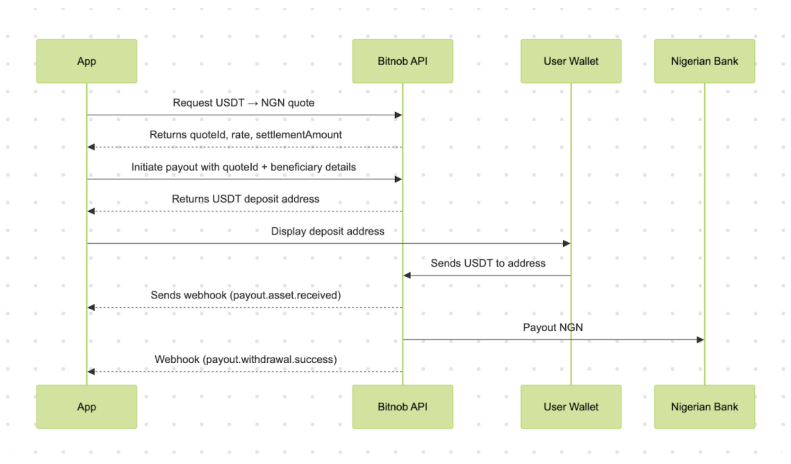
Request a Quote
Step: Lock in the exchange rate. Full schema: Create Payouts Quote.
Example Request
Example Response
What this means:
The rate is guaranteed for 15 minutes, until the expires_at timestamp
You must initialize, finalize, and receive funds within this window
Initiate the Payout
This step binds the quote to the destination bank account — see Initialize Payout. Confirm the account resolves first with Account Lookup.
Example Request
Example Response
What you should do next:
Display the returned USDT address to the user
Prompt them to send exactly 1000 USDT on TRC20 to the address
Start tracking the reference and quote_id for this session
Finalize the Payout
This approves the payout and submits it for processing — see Finalize Payout. It takes no request body — remember to sign with an empty body string.
You must call finalize before the expires_at returned by initialize. If it passes, the quote is dead — re-run the quote and initialize steps to lock a fresh rate.
Example Response
The payout moves to PENDING. The USDT address stays valid until expires_at — once the deposit lands, settlement proceeds automatically.
Simulate Deposit (Sandbox Only)
For testing purposes, you can simulate a deposit.
Example Request
This endpoint exists only in sandbox — it tells the simulator to act as if the user just deposited the specified amount of currency at address on chain. The resulting transaction shows up in the Transactions API with metadata.is_simulated: "true" and a sim_* reference. Production accounts will reject the call.
Settlement Lifecycle (What Happens After Deposit)
Once the user funds the address, Bitnob handles the rest of the flow — track it with Get Payout by ID or the payout webhooks:
It confirms receipt (usually within 1–2 blocks for TRC20)
Converts the USDT to NGN at the locked quote rate
Sends the NGN to the provided bank account
Sends a payouts.processing webhook when the settlement rail picks up the payout, then a payouts.withdrawal.success webhook to your callback_url when completed
Handling Quote Expiry, Underpayment, or Failure
If the user sends less than quoted, the payout still processes — the fiat amount delivered is pro-rated based on the amount actually received, with the difference calculated at the original quoted FX rate (within allowed margin).
If no deposit is received before expiry (15 min), Bitnob cancels the payout and sends a payouts.withdrawal.expired webhook.
If a withdrawal fails (e.g., due to an invalid account), the payout record moves to FAILED — poll Get Payout by ID to detect it.
Always listen for webhooks to track transaction outcomes.
Best Practices
Always display the exact amount and chain to the user.
Poll Get Payout by ID if you don't implement webhooks yet.
Use a unique reference per payout — this is your trace ID.
Store the quote_id, reference, beneficiary, and address in your database for future reconciliation.
What This Flow Enables
You now have a programmable way to:
Receive USDT from anywhere in the world
Convert it automatically
Deliver it in local fiat to a verified bank account
Handle all messaging via webhooks
This is ideal for:
Remittance apps
Pay suppliers or gig workers in Nigeria
Crypto liquidation from global wallets