

CLIENT_SECRET lets the holder sign requests as you, and money movement does not reverse.
This guide covers how to hold credentials across development, staging, production, and CI. It also covers what to do when one leaks.
Understand what you hold
Your credentials are a pair.
The secret never goes over the wire. You use it to compute an HMAC signature, and we recompute the same signature to verify the request. See Authentication.
The Bitnob Enterprise API uses a different credential, an
X-API-Key header. The rules on this page apply to it as well.Keep credentials out of source code
Never write a secret into a file you commit, even in a private repository. Repository history keeps the value after you delete the line. Do not do this:.gitignore before the first commit.
Separate the two secrets
YourCLIENT_ID is the same in sandbox and production. Only the CLIENT_SECRET differs, and the secret you sign with decides whether a request moves real money.
Name the two variables so that no one confuses them:
Keep credentials out of client applications
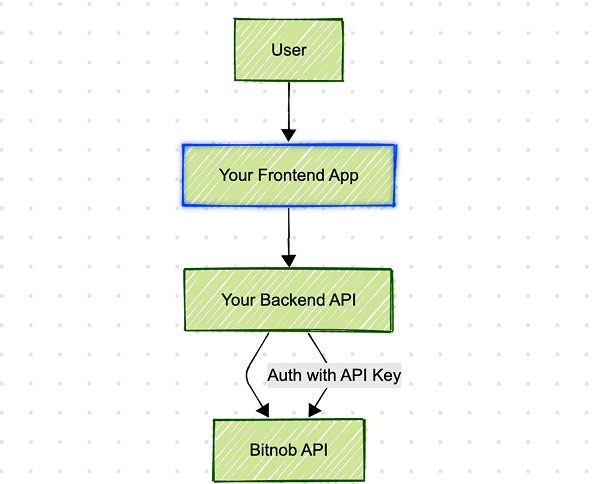
A credential must live only on a server you control. Do not place one in:- A browser application. Anyone can read it from the network tab.
- A mobile application. Anyone can extract it from the package.
- Any client-side JavaScript bundle.
Use a secret manager in production
Environment files are acceptable in development. In production, use a manager that injects secrets at runtime:- AWS Secrets Manager
- GCP Secret Manager
- HashiCorp Vault
- Doppler, Infisical, or 1Password Secrets Automation
Rotate on a schedule
Rotate every 60 to 90 days. Rotate immediately when:- An engineer leaves the team.
- A credential appears in a log, a ticket, or a screenshot.
- You give a contractor or a partner access.
1
Create the new key
Create a second key in Settings > API Keys. Both keys work at the same time.
2
Confirm the new key
Call
/api/whoami with the new secret. See Validate authentication.3
Deploy the new key
Roll the new secret out to every service that signs requests.
4
Revoke the old key
Revoke the old key only after traffic on it stops.
Scan for leaked credentials
Run a scanner on every commit. These tools catch a secret before it reaches a shared branch:- GitGuardian
- TruffleHog
- GitHub Advanced Security
Redact credentials from logs
Never log a full secret, anAuthorization header, or an X-Auth-Signature value. Redact them before the log line is written.
CLIENT_ID and the correlation_id instead. Both identify the request without exposing the secret.
Watch for misuse
Track your own call volume, so that unusual activity is visible:- Total requests per minute.
- Requests per endpoint.
- Failures by status code.
- Source region, if your traffic should come from one place.
Respond to a leak
Assume that a credential will leak one day, and make the response fast.1
Revoke the key
Revoke it in the dashboard. Revocation takes effect immediately.
2
Create and deploy a replacement
Create a new key and roll it out.
3
Review activity
List transactions for the exposed period and compare them against your own records. See Observability, logging, and traceability.
4
Contact support
Report any transaction you cannot account for. Quote its
correlation_id and its reference.